canonry

$ canonry --help

The operating platform for AEO.

Canonry tracks how ChatGPT, Gemini, Claude, and Perplexity cite your pages and then hands your coding agent (or the bundled Aero) the tools to close the gap and ship the fix. All locally; all open source.

$ brew install ainyc/canonry/canonry

Then canonry init && canonry serve. Need another option? All install options →
onlinesession.ainyc4/4 providers11 phrases0%

One prompt · for your AI coding agent

Paste once. Your agent does the rest.

Drop this into Claude Code, Codex, or any shell-capable agent. It installs canonry, runs your first citation sweep, audits your site for AEO readiness, and stops for your sign-off before taking any action on your behalf.

Prompt
Set up canonry for me. Canonry is an open-source platform that tracks how AI answer engines (Gemini, ChatGPT, Claude, Perplexity) cite my site.

1. Ask me for: my domain, 3–5 queries I want to track, and which provider I want to start with (gemini / openai / claude / perplexity). Wait for my answers before proceeding.
2. Run `npm install -g @ainyc/canonry`.
3. Run `cnry init` in this directory. This scaffolds config and installs the canonry skills into `.claude/skills/canonry/`, `.claude/skills/aero/`, `.codex/skills/canonry/`, and `.codex/skills/aero/`. If the skills aren't there afterwards, run `cnry skills install`.
4. Read the operator playbook at `.claude/skills/canonry/SKILL.md` and follow it end-to-end: create the project with my domain and queries, wire up the provider key I chose, and trigger the first sweep.
5. Open my browser to the dashboard so I can see the run results.
6. Switch to the analyst playbook at `.claude/skills/aero/SKILL.md` and run a baseline AEO audit on my behalf. Read citation evidence with `cnry evidence <project> --format json`, then run `npx @ainyc/aeo-audit "<my-domain>" --sitemap --format json` for a site-readiness score. The `--sitemap` flag audits every page listed in my sitemap instead of just the homepage, so the readiness score reflects the whole site.
7. Summarize what you found: my mention and citation rates per provider, the top 3 queries I'm not yet cited on, and the highest-impact site issues from the audit. Ask me for permission before taking any further action, such as drafting content, submitting URLs for indexing, editing files, or anything else that changes my site.

The agent reads the bundled skill at .claude/skills/canonry/SKILL.md (or .codex/skills/canonry/SKILL.md).

Stack

Same client. Four entry points.

118

REST API

endpoints, self-served OpenAPI 3.1

$ GET /api/v1/citations?provider=claude

Browser provider over CDP captures live ChatGPT, Gemini, and Claude UIs. Compatible with Claude Code, OpenAI Codex, Cursor, and the bundled Aero agent.

Plugs into Google Search Console, Google Analytics 4, Bing Webmaster, WordPress, Common Crawl, IndexNow, and server-log ingestion from WordPress, Vercel, and Cloud Run, to watch AI crawlers hit your pages and AI products refer real traffic.

Connects Google Business Profile for local AEO: the impressions, calls, direction requests, and search keywords behind your Google Maps and local-search presence, plus a cross-check of what your public listing advertises against the profile you control.

Built for agents

Observability. For humans.

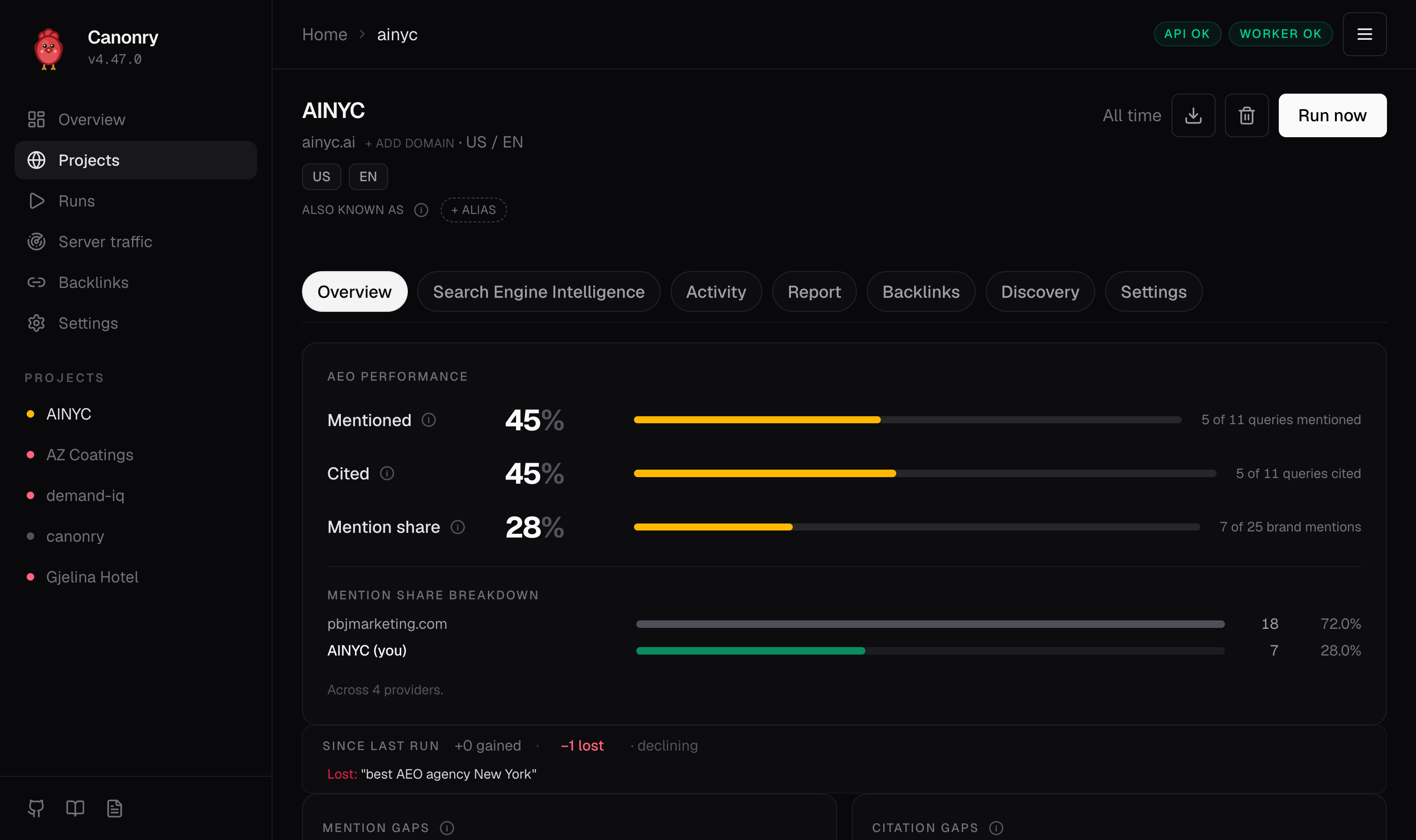
Canonry project overview for ainyc.ai showing mentioned 45 percent, cited 45 percent, mention share 28 percent, mention share breakdown against pbjmarketing.com, and since-last-run delta of zero gained one lost
Mentioned · cited · mention share · run delta · per project.

Walkthrough

See it run.

Two-minute tour. Project setup through first citation. Read the walkthrough →

Frequently asked

Common questions.

Definitions, how-tos, comparisons, and stack questions. Click any question to expand the answer.

What is...

Definitions

4
  • What is AEO (Answer Engine Optimization)?

    AEO is the discipline of making sure your content shows up accurately and prominently in the synthesized answers produced by generative engines like ChatGPT, Gemini, Claude, and Perplexity. It is the successor to SEO: instead of optimizing for ten blue links, you optimize for the model's citation graph, retrieval surface, and the structured signals (JSON-LD, llms.txt, schema completeness) that decide whether a model trusts your page enough to cite it.

  • What is Canonry?

    Canonry is the open-source, agent-native operating platform for AEO. It tracks how AI engines cite your site, sweeps standard SEO surfaces (Google Search Console, Bing, GA4), diagnoses regressions to the deploy that caused them, drafts schema patches, and re-verifies the fix. All of it runs through a typed tool surface designed to be called by a coding agent.

  • What is Aero?

    Aero is the bundled agent that ships with every Canonry install. It uses the exact same typed surface as Claude Code, Codex, or Cursor, just pre-wired with no setup. Aero is backed by pi-agent-core and works with 15+ LLM providers. Use it as a fallback when you don't want to bring your own coding agent.

  • What is the agent surface?

    The agent surface is what Canonry hands to a local coding agent: 30+ CLI commands, 118 REST endpoints, 48 MCP tools across 5 toolkits, and 6 webhook events. The CLI, REST API, MCP adapter, and webhook subscriber all wrap the same public client, so whatever your agent speaks, Canonry speaks back.

How does...

How it works

5
  • How does Canonry monitor AI citations?

    Canonry sweeps each provider's API on a schedule (Gemini, OpenAI, Anthropic, Perplexity), captures the answer and citation list per phrase, and stores results in local SQLite. For consumer surfaces where the API differs from the web UI (e.g. ChatGPT with web search), the CDP browser provider drives a real Chrome session against the live UI to capture citations as a user actually receives them.

  • How do I install Canonry?

    Three options: Homebrew (brew install ainyc/canonry/canonry), npm (npm install -g @ainyc/canonry on Node 22+), or Docker (docker run --rm -p 4100:4100 -v canonry-data:/data arberx/canonry). After install, run canonry init to create the SQLite store at ~/.canonry/data.db, then canonry serve to start the dashboard at localhost:4100.

  • How does Canonry fix regressions automatically?

    When a sweep completes, Canonry's bundled agent (or yours, via webhook) reads the result, identifies lost citations, calls get_evidence and diff_snapshot to trace the cause to a deploy, drafts a schema patch or content fix, calls request_indexing against Google Search Console, and schedules a verify sweep in 6 hours. You wake up to a triaged decision, not an inbox of alerts.

  • How do I connect my coding agent?

    The recommended path is the CLI. Every command supports --format json so any shell-driven agent can pipe results in and out. For Claude Desktop, Cursor, and Codex you can also use the MCP adapter: run canonry mcp install --client claude-desktop (or --client cursor / --client codex) and the 48 tools register automatically.

  • How is Canonry self-hosted?

    Canonry runs entirely on your machine or your server. The data store is a single SQLite file at ~/.canonry/data.db. Your disk, your backup, your data. No cloud account required, no per-prompt pricing, no shared multi-tenant database. Docker images are published to Docker Hub and GHCR; one-click Railway deploys are supported.

How is it different...

Comparisons

3
  • How is Canonry different from a CLI bolted onto a SaaS dashboard?

    Canonry is agent-native: it was built from the ground up to be driven by agents. Every CLI command supports --format json, every dashboard view has a matching REST endpoint, the MCP adapter exposes the same surface to Claude Desktop, Cursor, and Codex, and webhooks let any agent wake up unprompted. Legacy AEO products added a CLI later. Canonry started there.

  • How is Canonry different from other AEO tools?

    Canonry is source-available, self-hosted, and agent-first. Other AEO tools are cloud SaaS dashboards: you log in, look at charts, copy-paste suggestions. Canonry hands the same data to a typed agent surface so a coding agent can read it, diagnose it, and fix it without you ever opening a dashboard. You also own your data and run your own provider keys.

  • Does Canonry replace my coding agent?

    No. Canonry provides the typed tool surface, evidence, budget, and verification loop. Your agent does the actual code edits. Bring Claude Code, OpenAI Codex, Cursor, OpenClaw, or GitHub Copilot over CLI or MCP. The bundled Aero agent is for users who don't want to wire up their own.

Will it work with...

Your stack

6
  • Which AI engines does Canonry monitor?

    Gemini (including AI Overviews), OpenAI ChatGPT, Anthropic Claude, Perplexity, and any OpenAI-compatible local LLM such as Ollama, LM Studio, or vLLM. Provider keys are yours; rate limits are respected per provider.

  • Will it work with my CMS and analytics stack?

    Out of the box: Google Search Console (coverage, URL inspection, request-indexing via OAuth), Bing Webmaster (API key auth), Google Analytics 4 (traffic, AI referrals, attribution), Google Business Profile (local-AEO metrics, search keywords, and booking CTAs via OAuth), WordPress (REST + Application Passwords for content publish), Common Crawl (workspace-level release sync via DuckDB), and server-log ingestion from WordPress, Vercel, and Cloud Run for AI crawler hits and AI-product referrals. Custom integrations connect via the same MCP/REST surface your agent uses.

  • Does Canonry track local search and Google Business Profile?

    Yes. Connect Google Business Profile with the same Google OAuth you already use for Search Console, and Canonry tracks your local-AEO surface: daily performance metrics (impressions across Search and Maps, calls, direction requests, website clicks, bookings), the monthly search keywords that surface your business, and your booking, reservation, and order CTAs. For hotels it also snapshots lodging attributes and cross-references what your public Google listing advertises against the profile you actually control, flagging the gaps. Everything syncs to local SQLite on a gbp-sync schedule and is exposed over the same CLI, REST, and MCP surface as the rest of Canonry, so your agent works local presence the way it works answer-engine citations.

  • Can Canonry see AI bots crawling my site or AI products sending traffic?

    Yes. Canonry pulls server logs on a schedule and rolls them up into two hourly tables: crawler_events_hourly (AI bot user-agent + path + count) and ai_referral_events_hourly (referrer host + landing path + count). It recognises GPTBot, ClaudeBot, OAI-SearchBot, PerplexityBot, Google-Extended, and referrals from chatgpt.com, claude.ai, perplexity.ai, gemini.google.com, copilot.microsoft.com, and more. Supported log sources include WordPress, Vercel, and Cloud Run. Same scheduler as visibility sweeps; same evidence, insight, and report pipeline.

  • Can Canonry read what users actually see in ChatGPT?

    Yes. Canonry's CDP (Chrome DevTools Protocol) browser provider drives a real Chrome session against the live ChatGPT, Gemini, or Claude web UI and captures the answer and citations exactly as a user receives them. This is critical when API responses differ from the consumer web UI, for example when web-search context is included in the consumer experience but not in the API.

  • Is the source code public?

    Yes. Canonry's full source is public on GitHub at github.com/AINYC/canonry and the npm package @ainyc/canonry is publicly available. You can read it, run it, and self-host it. Licensing details are being finalized; reach out via GitHub if you need clarity for commercial use.